
Event Tickets Plus seamlessly integrates with WooCommerce to provide a comprehensive solution for selling event tickets directly from your WordPress site. This integration transforms each ticket into a WooCommerce product, enabling you to leverage WooCommerce’s robust e-commerce features for ticket sales.
Getting Started
To begin selling tickets with Event Tickets Plus and WooCommerce:
- Install Required Plugins: Ensure you have the Event Tickets, Event Tickets Plus, and WooCommerce plugins installed and activated on your WordPress site.
- Configure WooCommerce: Set up your preferred payment gateways and adjust settings as needed.
- Create Events and Tickets: Use the Event Tickets Plus interface to add events and associated tickets, customizing details like pricing, availability, and attendee information fields.
- If you are using multiple e-commerce solutions, make sure to select WooCommerce under ticket settings.
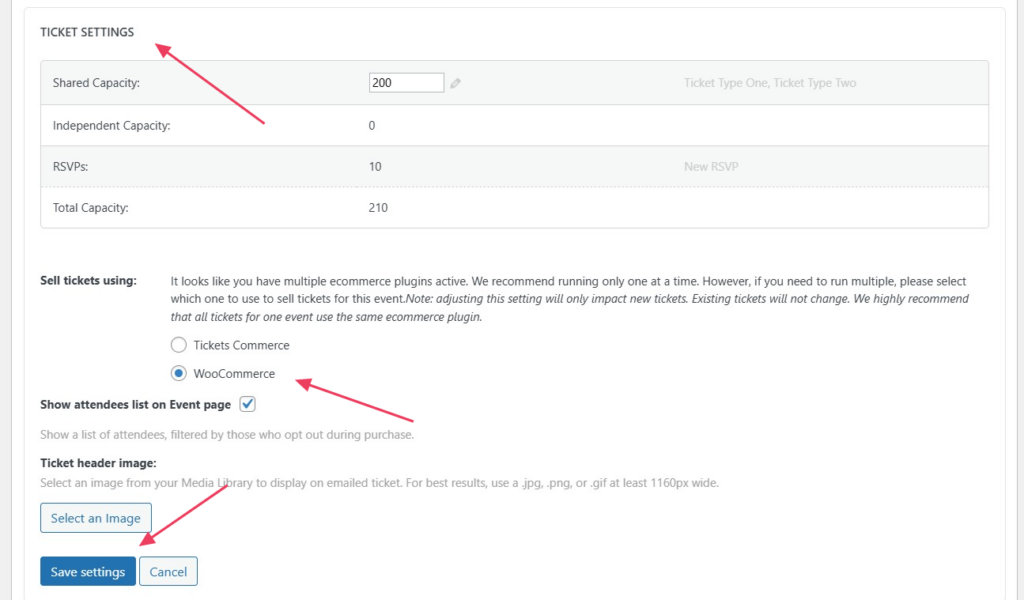
By combining the powerful features of Event Tickets Plus and WooCommerce, you can create a seamless and efficient ticketing system tailored to your event needs.
Tickets as WooCommerce Products
When you create a ticket using Event Tickets Plus, it automatically generates a corresponding WooCommerce product. This product is typically set as a “virtual” and “hidden” item by default, ensuring a streamlined ticketing process without cluttering your product catalog. However, you have the flexibility to make these ticket products visible in your WooCommerce store if desired.
This setup allows you to manage ticket sales using WooCommerce’s familiar interface, handling aspects like pricing, inventory, and order processing with ease.
Benefits of WooCommerce Integration
1. Unified Shopping Experience
Customers can purchase event tickets alongside other products in your WooCommerce store, all within a single transaction. This unified cart experience simplifies the purchasing process and can increase overall sales.
2. Enhanced E-commerce Features
Leveraging WooCommerce’s extensive features, you can:
- Offer discount codes and promotional pricing.
- Implement flexible payment options, including deposits and payment plans.
- Utilize a wide range of payment gateways supported by WooCommerce.
- Manage stock levels and set purchase limits for tickets.
- Generate detailed sales reports and analytics.
These capabilities provide greater control over your ticket sales and enhance the customer experience.
Extending Functionality with WooCommerce Extensions
You can enhance your ticketing system further by utilizing WooCommerce extensions. While Event Tickets Plus integrates tightly with WooCommerce, it’s important to note that we cannot guarantee compatibility or provide support for third-party WooCommerce extensions.