
Adding a custom currency to Tickets Commerce allows you to support transactions in currencies that are not included in the default list. By default, Tickets Commerce supports a wide range of global currencies. You can review the full list here: Supported Currencies for Tickets Commerce
If your currency is not included, you can register it with a simple code snippet. Below, we’ll show you how to add the Kuwaiti Dinar (KWD) as an example.
Place the following code in your child theme’s functions.php file or via Code Snippets plugin:
add_filter( 'tec_tickets_commerce_currency_code_options', function( $options ) {
	$options['KWD'] = 'Kuwaiti Dinar (KWD)';
	ksort( $options );
	return $options;
} );

add_filter( 'tribe_tickets_commerce_currency_code_options_map', function ( $map ) {
	$map['KWD'] = array(
		'name'          => __( 'Kuwaiti Dinar (KWD)', 'event-tickets' ),
		// Arabic symbol "د.ك". Use HTML entities to match TEC's style.
		'symbol'        => 'د.ك',
		'decimal_point' => '.',   // KWD typically uses 3 decimals.
		'thousands_sep' => ',',
	);

	ksort( $map );

	return $map;
} );
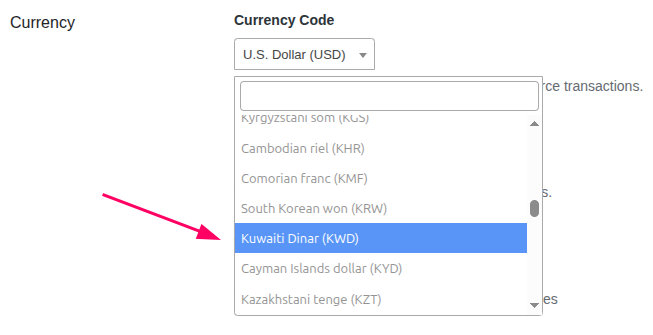
The snippet above will add KWD as a currency option in WP Admin Dashboard → Tickets → Settings → Payments → Tickets Commerce → Currency, as shown below:
Key Details in the Snippet
tec_tickets_commerce_currency_code_options
Adds your new currency option to the dropdown list in Tickets Commerce settings.tribe_tickets_commerce_currency_code_options_map
Defines how your custom currency is displayed and formatted.- Symbol: The Arabic Dinar symbol
د.كis added as an HTML entity so it renders correctly in the frontend. - Decimal Precision: The Kuwaiti Dinar often uses 3 decimal places. You can adjust this in the
decimal_pointand formatting logic if needed. - Sorting:
ksort()is used to keep the currency list in alphabetical order after your custom currency is added.
Things to Note
- You can replace
"KWD"with any other custom currency code and adjust the name, symbol, and formatting details. - Always back up your site before making changes to your theme or plugin files.
- It is recommended to test the code snippet first in a staging site to catch any unforeseen issues before applying to it to your live site.