
Skip to content
  • My Account

Knowledgebase

  • Guides
    • Getting Started
    • Advanced Topics
    • Use Cases
  • Products
    • The Events Calendar
    • Events Calendar Pro
    • Event Tickets
    • Event Tickets Plus
    • Filter Bar
    • Event Aggregator
    • Community
    • Promoter
    • Eventbrite Tickets
    • Seating
    • Event Schedule Manager
  • Articles

Knowledgebase

  • Knowledgebase
  • Main Menu
  • Guides
    • Getting Started
    • Advanced Topics
    • Use Cases
  • Products
    • The Events Calendar
    • Events Calendar Pro
    • Event Tickets
    • Event Tickets Plus
    • Filter Bar
    • Event Aggregator
    • Community
    • Promoter
    • Eventbrite Tickets
    • Seating
    • Event Schedule Manager
  • Articles
  • Products
    • Calendar
    • Tickets & RSVP
    • Import Events
    • Community Submissions
    • Promote
  • Bundles
    • The Complete Collection
    • Event Marketing Bundle
    • Events Importer Bundle
    • Virtual Event Marketing Bundle
    • Community Manager Bundle
  • Resources
    • Get Help
    • Release Notes
    • Developer Docs
    • Feature Request
  • Demo
  • My Account

Finding Order Invoices

Last Updated:Jan 27, 2025

If you’ve purchased a premium plugin from us and need an invoice, we’ve got you covered. First, go to your account page and Account Details screen in your account. Scroll down to the Transaction History section and find the transaction for which you need the invoice. Once you’ve found the transaction, click on the three dots next to it and select Invoice from the dropdown menu.
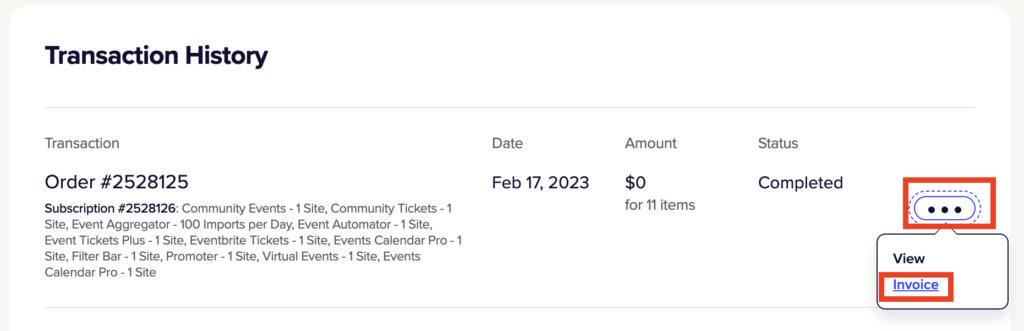
The invoice will open in a new tab. You can then download it by using the Download button. The appearance and location of the download option may vary depending on your browser.

Adding a VAT number

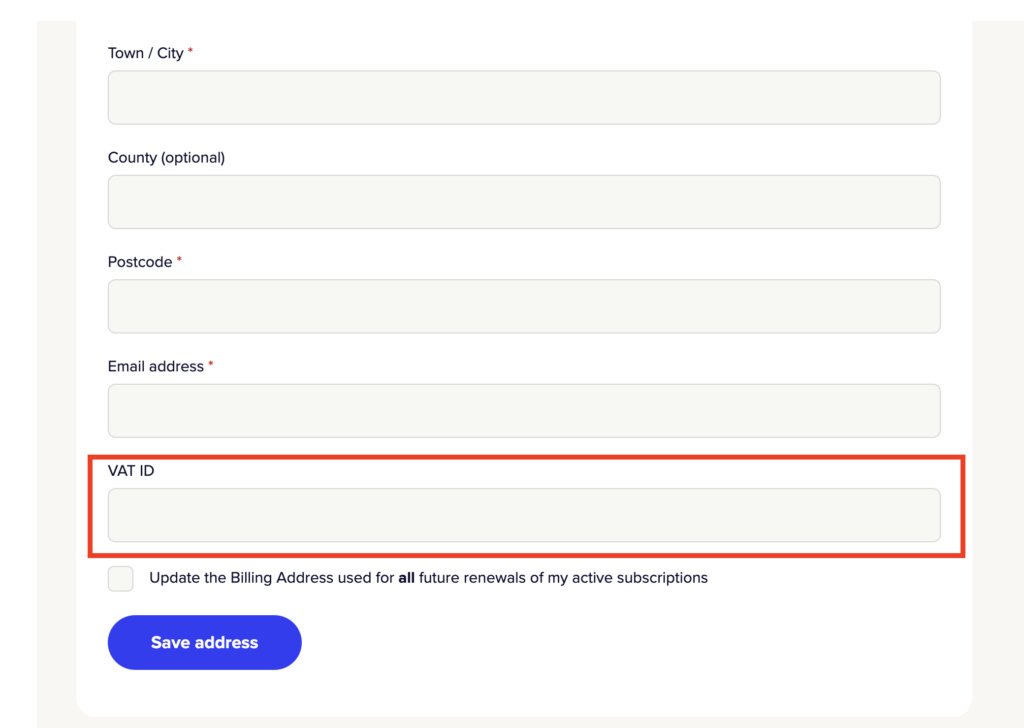
If you need a specific VAT number to appear on your invoice, you can add it under Payment Methods > Edit Address >VAT number on your Account page.

Notify us of out of date information
CONTENTs
  • Adding a VAT number
Event Seating product

RELATED ARTICLES:

  • How to Replace webcal:// with https:// in iCal Links
  • How to Show Only Weekend Events in List View with The Events Calendar
  • Changing Ticket and RSVP Labels
  • How to Add a Custom Currency in Tickets Commerce
  • Adding event description into PDF ticket

ACCOUNT TOOLS:

  • Support Resources
  • My Account
  • Contact Support
  • Downloads and Licenses
  • Manage Subscriptions

A Liquid Web Brand

Hosting for WordPress

© 2023 All Rights Reserved.