
Event Tickets is a great plugin that allows you to make money by selling tickets to events. This is accomplished by using our default payment method called Tickets Commerce, which allows you to connect to Stripe or PayPal for collecting payment.
While this solution works great, it does have certain limitations.
You might find yourself wanting to use a payment gateway other than Stripe, or PayPal, or maybe you want to be able to create coupons your customers can use on their ticket purchases.
👋 While WooCommerce is a free plugin, using WooCommerce with Event Tickets requires Event Tickets Plus
WooCommerce opens up a lot of options for Event Tickets Plus users, and in this article, we’ll show you how to create some simple coupons.
Creating Coupons
You can get started creating coupons by following WooCommerce’s documentation at https://docs.woocommerce.com/document/coupon-management/.
We’ll go over this in a bit more depth.
First, make sure that Event Tickets Plus and WooCommerce are both fully updated. Then you can go ahead and create an Event and add a Ticket to it, or you can add one to an already created event.
Next, head to the WooCommerce’s Marketing options under Marketing > Coupons. This menu will let you create them:
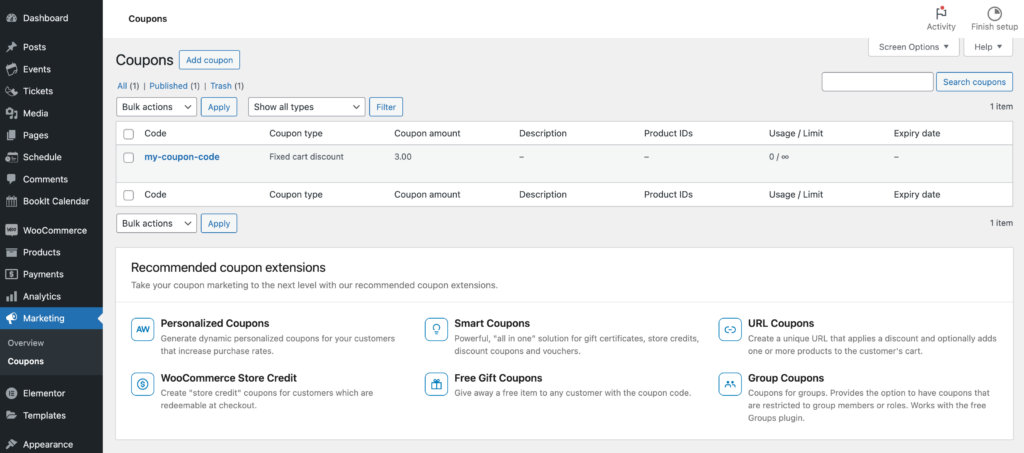
Simply click on Add Coupon and it will bring up the creation menu.
Here, you can create different types of coupons as well. There are multiple options for the type of coupon, either a percentage discount, or a fixed discount. You can also limit or restrict the coupon itself; how many times it can be used, the minimum cart price for it to be allowed and much more!

These coupons can then be used on the WooCommerce Checkout page after adding a ticket. Depending on your theme, this may require clicking Have a coupon? Click here to enter your code first. Type the code in the box and you should see your discount pop up!