
When using the RSVP functionality of Event Tickets, you’ll notice that only the main guest is asked or is required to submit their name and email address on the RSVP form. However, there may be a time when you need the names of the other guests that the main guests is bringing with. For this, we will tap on the Attendee Information feature of Event Tickets Plus and tweak it a bit to conform with our use case.
The steps are as follows:
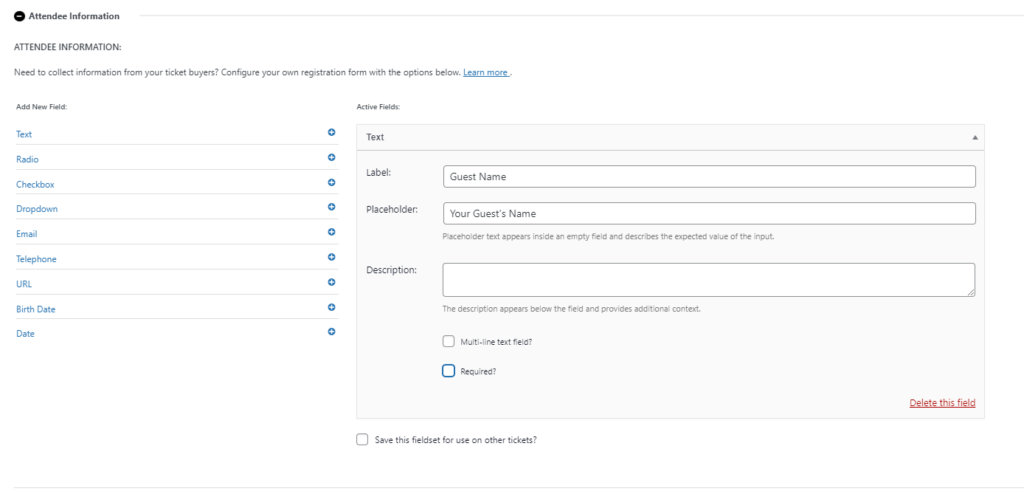
Attendee Information
Add a text field called “Guest Name” on the Attendee Information setting of your RSVP.
Tweak using template file customization
- Copy the
\wp-content\plugins\event-tickets-plus\src\views\v2\components\meta\text.phpfile to your[theme or child-theme]/tribe/tickets-plus/v2/components/meta/folder to override it.
- Edit the “target” file (the one in your theme or child-theme folder) so it contains the code below, which does the following: It appropriately requires the guest name field for all other attendees and does not show the field to the main guest.
<?php
$multiline = Tribe__Utils__Array::get( $field, [ 'extra', 'multiline' ], null );

if ( $field->slug == 'guest-name' ) {
	if ( $attendee_id === 0 ) {
		$required = false;
	}
}
?>
<div
	<?php tribe_classes( $classes ); ?>
	<?php tribe_attributes( $attributes ); ?>
>
<?php if ( $attendee_id === 0 && $field->slug == 'guest-name' ) { return; } else { ?>
	<label
		class="tribe-tickets__form-field-label"
		for="<?php echo esc_attr( $field_id ); ?>"
	><?php echo wp_kses_post( $field->label ); ?><?php tribe_required_label( $required ); ?></label>
	<div class="tribe-tickets__form-field-input-wrapper">
		<?php if ( $multiline ) : ?>
			<textarea
				id="<?php echo esc_attr( $field_id ); ?>"
				class="tribe-common-form-control-text__input tribe-tickets__form-field-input"
				name="<?php echo esc_attr( $field_name ); ?>"
				placeholder="<?php echo esc_attr( $placeholder ); ?>"
				<?php tribe_required( $required ); ?>
				<?php tribe_disabled( $disabled ); ?>
			><?php echo esc_textarea( $value ); ?></textarea>
		<?php else : ?>
			<input
				type="text"
				id="<?php echo esc_attr( $field_id ); ?>"
				class="tribe-common-form-control-text__input tribe-tickets__form-field-input"
				name="<?php echo esc_attr( $field_name ); ?>"
				value="<?php echo esc_attr( $value ); ?>"
				placeholder="<?php echo esc_attr( $placeholder ); ?>"
				<?php tribe_required( $required ); ?>
				<?php tribe_disabled( $disabled ); ?>
			/>
		<?php endif; ?>
		<?php if ( ! empty( $description ) ) : ?>
			<div class="tribe-common-b3 tribe-tickets__form-field-description">
				<?php echo wp_kses_post( $description ); ?>
			</div>
		<?php endif; ?>
	</div>
<?php } ?>
</div>
That’s it and Enjoy!