
Users may occasionally experience the message error “invalid Eventbrite token” when we are importing events and tickets from our Eventbrite account to our Events Calendar using the Events Aggregator.
The Eventbrite token is used to verify the identity of a user or a system when is connected to other services.
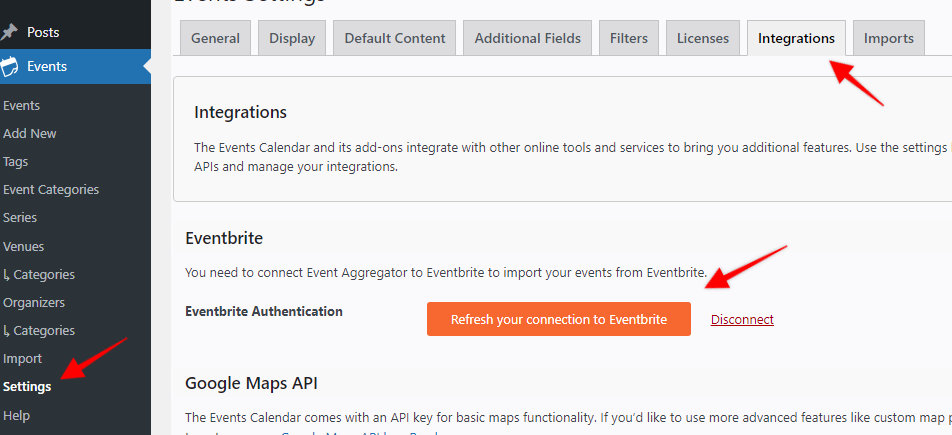
In these cases, we recommend visiting the Events > Settings > Integrations Tab section and clicking on the “Refresh your connection to Eventbrite” button.
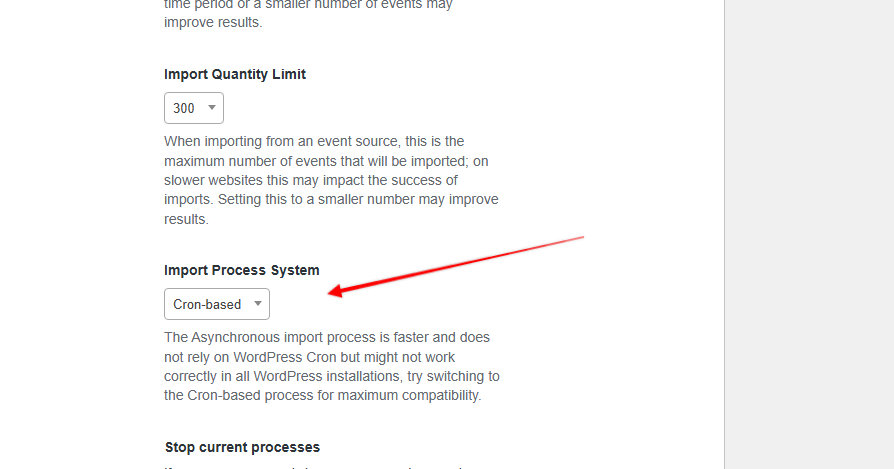
Another thing that could help in some situations is switching the Import Process System from “Asynchronous” to “Cron-based” in the Events > Settings > Imports Tab section
However, if the above does not fix it, it could indicate a larger conflict on the site or that something is interfering with the connection.
You can check the Event Aggregator System status page to see if there are any possible issues with our servers, and you can also whitelist the IP address listed here.
If these do not remedy the issue, don’t hesitate to pay us a visit over at our help desk if you should have any further questions–we’re more than happy to assist.