
Our Event Tickets Plus App is the easiest and fastest way to check-in your attendees directly from your Android or iOS device without the need to log in to your site. But sometimes, things don’t work out exactly as expected. These are the error messages you might encounter:
- Please verify your API key is correctly entered on the settings page.
Check your API key to ensure it matches the key on your WordPress installation. Confirm that The Events Calendar REST API is not blocked or disabled. Make sure the site is not on a local server, password protected, or otherwise inaccessible. - Scan failed, try again
Something failed with the scan. Either it’s not loading correctly, or your WordPress site is not available. - Camera permission is not granted
You’ll need to allow the app to have camera permissions. Go to another screen and then come back to the scanner to have permission asked for again if you click deny. - This attendee’s ticket is not authorized to be Checked in
If you see this message, it means the order in WooCommerce is still “Processing” and will need to be changed to “Completed”. This can be done manually, on a per-ticket basis, or you can use this plugin to automatically complete orders upon purchase: https://woocommerce.com/products/woocommerce-order-status-control/
Offline-Related Errors
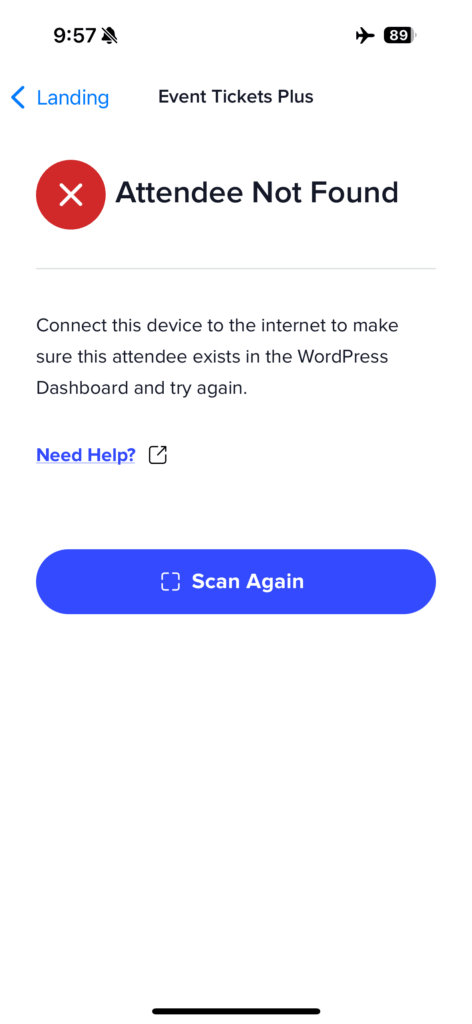
Attendee Not Found (while offline)
- This error appears when scanning a ticket while the app is offline, but the attendee data wasn’t included in your last sync. This commonly happens when someone purchases a ticket after you went offline. Solution: Connect to the internet, let the app sync, then try scanning again.
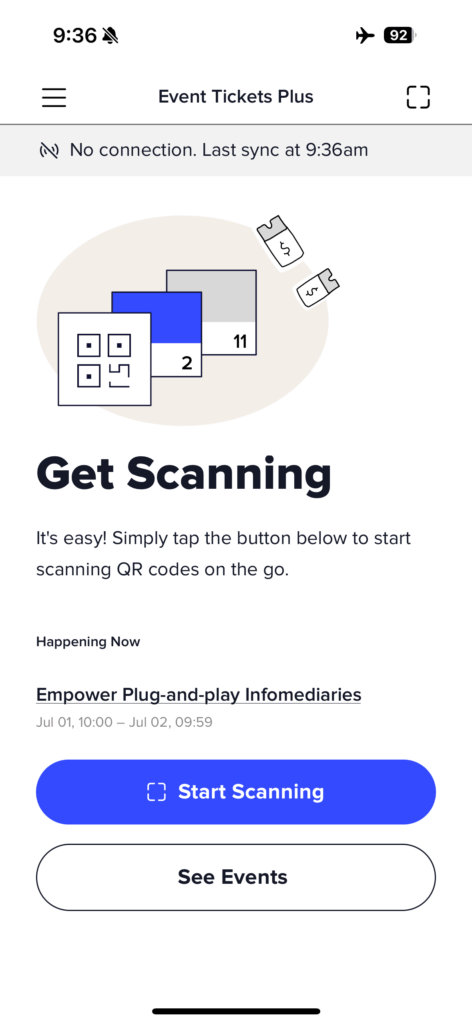
“App is offline” banner
- This isn’t an error, but a helpful indicator. When you see a small banner at the top of the app showing “App is offline” and your last sync time, it means you’re working without an internet connection, but can still check in previously synced attendees.
💡Tip: If you’re getting frequent connection errors in an area with weak internet, try turning on airplane mode and working entirely offline to avoid intermittent connection issues.
Don’t hesitate to pay us a visit over at our help desk if you should have any further questions–we’re more than happy to assist