
In the same way that traditional categories allow you to add organization to your blog posts, event categories allow you to add organization to your events. For example, with these categories, a music venue can add categories for the different genres of music that are played at the venue.
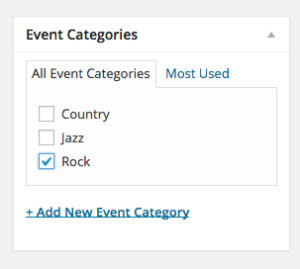
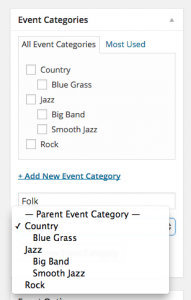
Additionally, the event categories can be hierarchical. This means you can group different categories together within the event categories. To continue the music venue example above, what if the venue organizer was very particular about music genres? Just saying “Country” isn’t going to cut it. Additional organization can be added by taking advantage of the “parent” category option to make the items hierarchical.
Displaying a Calendar of Events from a Single Category
Just like traditional WordPress categories, each event category has its own archive view. This is WordPress’s built-in way of showing all items that belong to a specific category. However, since event categories are added via our plugin, event category archives will display with all the features of a normal calendar view.
There are several ways to find the link for these archives, however, the quickest way is to navigate to the “Events” > “Event Categories” view of your WordPress dashboard. While on this screen, hover over the category you would like to link to and click on the “View” option. This will take to a calendar view with events just from the selected category. From the front end of the site, you can find a category archive at yoursite.com/events/category/category-slug/.
Adding Event Categories to Navigation Menus
Another great feature of using the Event Categories is the ability to quickly add these items to your website’s navigation menu. This will allow you to link directly to specific event categories giving your visitors quick links to their desired content.
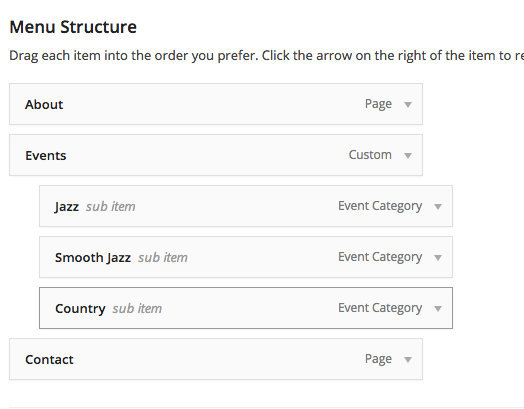
(Note that in order for the categories to be able to be added, you might first need to click Screen Options in the upper-right corner and make sure “Event Categories” is checked.)
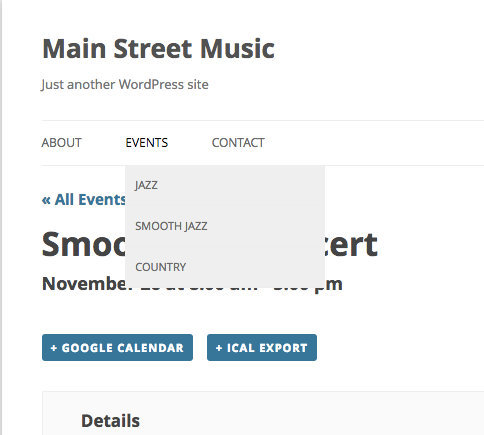
Once the categories are added to the menu, they will display on the front end of your site within your navigation menu in the same way as posts and pages.
Filtering Categories
For advanced filtering of events by category, check out our Filter Bar plugin. This will allow users to quickly filter events by event category, venue, organizer, price and more!