
In this post we’re going to look at modifying the names of various labels in the single event meta area. This is the section of the page that typically sits below the event description and lists things such as time, cost, any tags or categories and other information (such as details of the venue or organizer).
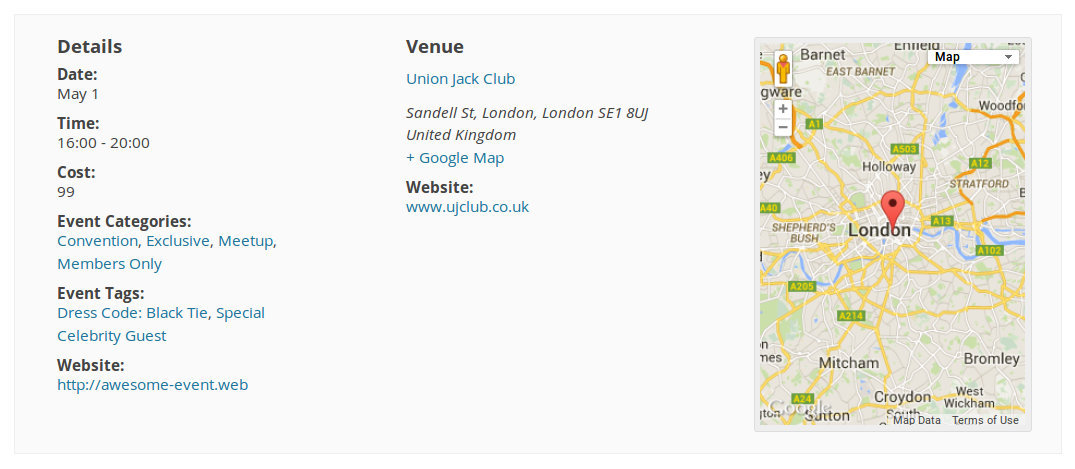
While the default labels work well in most cases, changing them can help you to craft a more intuitive experience for your visitors. In this post we’ll pick on two different fields, each of which require a slightly different approach:
- First, we’ll change the Website label to To learn more, visit
- Second, we’ll change Event Categories to Find similar events
- Then, we’ll change Event Tags to Find events with specific details
Website label
Our first task is to set up a template override for the the-events-calendar/src/views/modules/meta/details.php template — details on this process are described in full within the Customizing The Events Calendar article—then, within your custom copy, locate the following line:
$website_title = tribe_events_get_event_website_title();
$website_title is the variable that holds the Website label, which then gets displayed in the later part of the code. So, we’ll change this to the following:
$website_title = "To learn more, visit:";
Category label
Within the same template, look for the following chunk of code:
<?php
echo tribe_get_event_categories(
	get_the_id(),
	[
		'before'       => '',
		'sep'          => ', ',
		'after'        => '',
		'label'        => null, // An appropriate plural/singular label will be provided
		'label_before' => '<dt class="tribe-events-event-categories-label">',
		'label_after'  => '</dt>',
		'wrap_before'  => '<dd class="tribe-events-event-categories">',
		'wrap_after'   => '</dd>',
	]
);
?>
This displays the list of categories—but where is the label? It’s actually this single line found within the above chunk of code
'label' => null, // An appropriate plural/singular label will be provided
This simply tells The Events Calendar to use a default label (which magically changes depending on where there is just one category or several categories). To specify our own label, though, all we need to do is change that line to:
'label' => 'Find similar events:',
Be sure to keep the final comma in place! With those changes in place, we should now see:
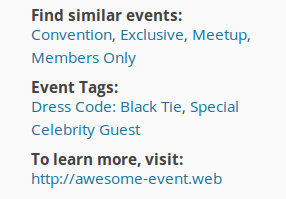
Event Tags label
Within the same template, look for the following chunk of code:
<?php
tribe_meta_event_archive_tags(
	/* Translators: %s: Event (singular) */
	sprintf(
		esc_html__( '%s Tags:', 'the-events-calendar' ),
		tribe_get_event_label_singular()
	),
	', ',
	true
);
?>
This displays the list of event tags—but where is the label? It’s actually the following lines found within the above chunk of code
/* Translators: %s: Event (singular) */
sprintf(
		esc_html__( '%s Tags:', 'the-events-calendar' ),
		tribe_get_event_label_singular()
	),
So, to specify our own label, we need to change that piece of code to:
'Find events with specific details:',
Be sure to keep the comma in place. So, the entire chunk of code should now look like the following:
<?php
tribe_meta_event_archive_tags(
	'Find events with specific details:',
	', ',
	true
);
?>
We hope that gives some insights into customizing the single event meta fields!