
If you need to correct the grammar in the “Get notified when tickets becomes available” message to “become available,” you can update it in two ways: using Loco Translate or by adding a custom PHP snippet.
Option 1: Change the Text Using Loco Translate
- In your WordPress dashboard, go to Loco Translate → Plugins.
- Find and click on Event Tickets Plus.
- Select the English language file.
- Click the Sync button to ensure all strings are up to date.
- In the search field, type the exact text:
Get notified when tickets becomes available - Select the result and update it to:
Get notified when tickets become available - Save your changes.
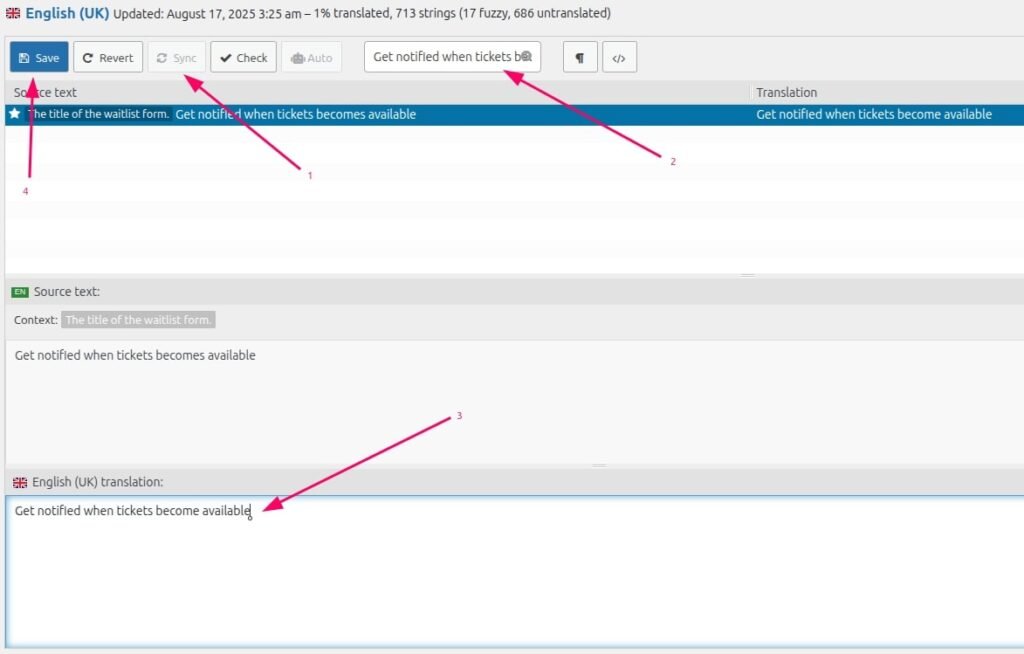
Notice: While this example uses English, you can use the exact same method for any other language. Just select the appropriate language file in step 3.
Option 2: Change the Text Using Custom PHP Snippet
If you prefer not to use a translation plugin, you can override this text programmatically.
Add the following code to your theme’s functions.php file or a site-specific plugin:
function tribe_replace_strings() {
    $custom_text = [
        'Get notified when tickets becomes available' => 'Get notified when tickets become available',
    ];

    return $custom_text;
}


function tribe_custom_theme_text ( $translation, $text, $domain ) {
    // If this text domain doesn't start with "tribe-", "the-events-", or "event-" bail.
    if ( ! check_if_tec_domains( $domain ) ) {
        return $translation;
    }

    // String replacement.
    $custom_text = tribe_replace_strings();

    // If we don't have replacement text in our array, return the original (translated) text.
    if ( empty( $custom_text[$translation] ) ) {
        return $translation;
    }

    return $custom_text[$translation];
}


function tribe_custom_theme_text_plurals ( $translation, $single, $plural, $number, $domain ) {
    // If this text domain doesn't start with "tribe-", "the-events-", or "event-" bail.
    if ( ! check_if_tec_domains( $domain ) ) {
        return $translation;
    }

    // If we're not doing any logic up above, just make sure your desired changes are in the $custom_text array above (in the `tribe_custom_theme_text` filter. )
    if ( 1 === $number ) {
        return tribe_custom_theme_text ( $translation, $single, $domain );
    } else {
        return tribe_custom_theme_text ( $translation, $plural, $domain );
    }
}


function tribe_custom_theme_text_with_context ( $translation, $text, $context, $domain ) {
    // If this text domain doesn't start with "tribe-", "the-events-", or "event-" bail.
    if ( ! check_if_tec_domains( $domain ) ) {
        return $translation;
    }

    // If we're not doing any logic up above, just make sure your desired changes are in the $custom_text array above (in the `tribe_custom_theme_text` filter. )
    return tribe_custom_theme_text ( $translation, $text, $domain );
}


function tribe_custom_theme_text_plurals_with_context ( $translation, $single, $plural, $number, $context, $domain ) {
    // If this text domain doesn't start with "tribe-", "the-events-", or "event-" bail.
    if ( ! check_if_tec_domains( $domain ) ) {
        return $translation;
    }

    // If we're not doing any logic up above, just make sure your desired changes are in the $custom_text array above (in the `tribe_custom_theme_text` filter. )
    if ( 1 === $number ) {
        return tribe_custom_theme_text ( $translation, $single, $domain );
    } else {
        return tribe_custom_theme_text ( $translation, $plural, $domain );
    }
}

function check_if_tec_domains( $domain ) {
    $is_tribe_domain = strpos( $domain, 'tribe-' )      === 0;
    $is_tec_domain   = strpos( $domain, 'the-events-' ) === 0;
    $is_event_domain = strpos( $domain, 'event-' )      === 0;

    // If this text domain doesn't start with "tribe-", "the-events-", or "event-" bail.
    if ( ! $is_tribe_domain && ! $is_tec_domain && ! $is_event_domain ) {
        return false;
    }

    return true;
}

// Base.
add_filter( 'gettext', 'tribe_custom_theme_text', 20, 3 );
// Translations with context.
add_filter( 'gettext_with_context', 'tribe_custom_theme_text_with_context', 20, 4 );
This code finds the original string and replaces it with your corrected text wherever it appears in Event Tickets Plus.
Summary
You can fix the text using either Loco Translate for a quick point-and-click method, or custom PHP code for a lightweight, plugin-free approach. The Loco Translate method is recommended for non-developers, while the PHP snippet is ideal for developers who want full control over text changes without relying on a translation plugin.