
By default, the only fields required when submitting an event through the Community plugin are ‘Title’ and ‘Description’, though you can also set other fields as required with this guide. If you would like to customize the error messages displayed to a user when a required field is missing, this is possible through the process we’ll cover in this guide.
Changing Error Messages for Default Required Fields
First, let’s understand where these error messages are coming from. If you go to your Event Submission page and try to submit an event without a title and description, you can use Chrome Dev Tools to inspect the page and use the console to enter tribe_submit_form_i18n . This will show the object errors where all the errors are stored. They all have key-value pair – in this case the key is the label for the field and the value is the error message to be output.
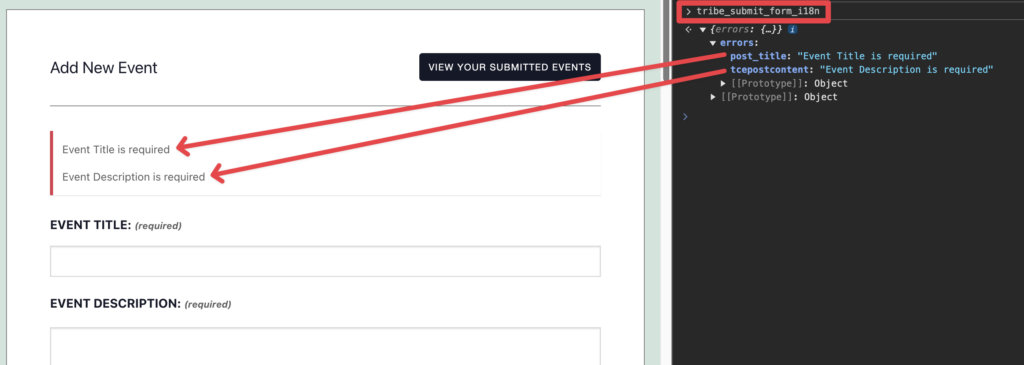
Since these errors are added through a script, we can use a snippet that modifies the script to update error messages:
add_action( 'wp_enqueue_scripts', function ( ) {
// Ensure the script is enqueued
	wp_enqueue_script( 'tribe_events-community' );

// Modify the localization data
	wp_add_inline_script( 'tribe_events-community', '
        if ( tribe_submit_form_i18n.errors[ "post_title" ] ) { // Tweak to match which field you want to change
        tribe_submit_form_i18n.errors[ "post_title" ] = "You cannot submit an event without a title"; // Tweak to match what message you want to output
        }
    ', 'before' );
}, 20 );
Here is how that would affect the frontend:
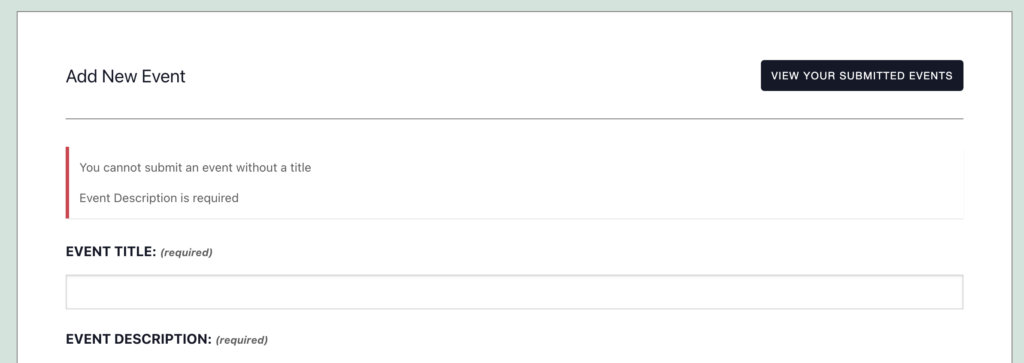
Let’s add to the Event Description to the same example:
add_action( 'wp_enqueue_scripts', function ( ) {
		// Ensure the script is enqueued.
		wp_enqueue_script( 'tribe_events-community' );

		// Modify the localization data.
		wp_add_inline_script(
			'tribe_events-community',
			'if ( tribe_submit_form_i18n.errors["post_title"] ) {
        tribe_submit_form_i18n.errors[ "post_title" ] = "You cannot submit an event without a title";
        }
        if ( tribe_submit_form_i18n.errors[ "tcepostcontent" ] ) {
        tribe_submit_form_i18n.errors[ "tcepostcontent" ] = "Please add an event description 🙈";
        }',
			'before'
		);
	}
);
And here is how that would affect the frontend:
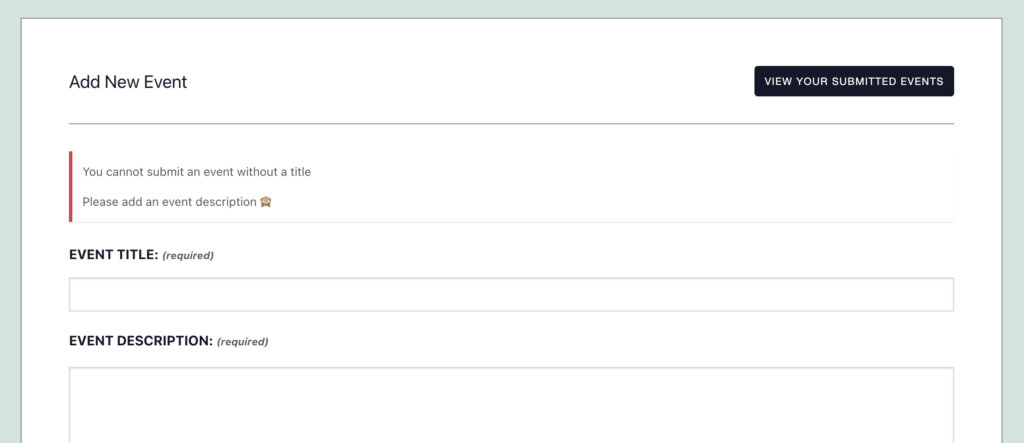
Changing Error Messages for Custom Required Fields
In the case where you have set up requiring fields other than the default, it is still possible to tweak the error message(s). This is assuming that you’ve set up Additional Fields with Events Calendar Pro. For this example, these are the Additional Fields we will be requiring and altering the error message:
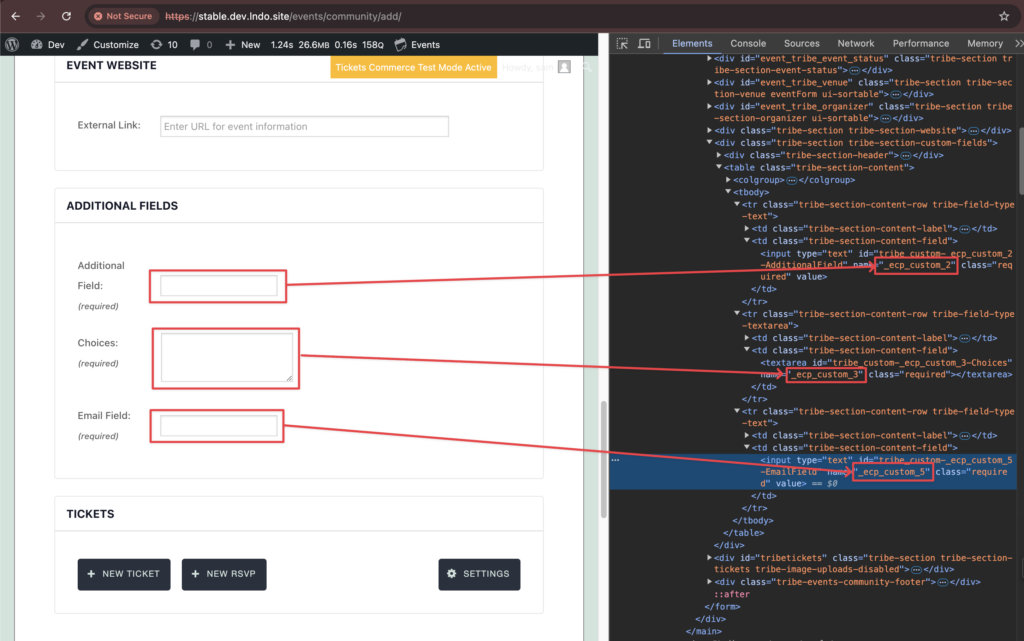
Here are the snippets all together to require and label all our additional fields at once (keeping in mind that in the example these are the custom fields 2, 3, and 5, which might be different on your site):
function my_community_required_fields( $fields ) {
	if ( ! is_array( $fields ) ) {
		return $fields;
	}
	$fields[] = '_ecp_custom_2';
	$fields[] = '_ecp_custom_3';
	$fields[] = '_ecp_custom_5';
	return $fields;
}

add_filter( 'tec_events_community_allowed_fields', 'my_community_allowed_fields' );

function my_community_allowed_fields( $fields ) {
	if ( ! is_array( $fields ) ) {
		return $fields;
	}
	$fields[] = '_ecp_custom_2';
	$fields[] = '_ecp_custom_3';
	$fields[] = '_ecp_custom_5';
	return $fields;
}

add_filter( 'tribe_community_events_field_label_text', 'tec_additional_fields_required_labels', 10, 2 );

function tec_additional_fields_required_labels( $text, $field ) {
	// Add required label if it is one of the Additional Fields.
	if ( strstr( $field, '_ecp_custom_2') ) {
		return $text . ' <span class="req">(required)</span>';
	}
	if ( strstr( $field, '_ecp_custom_3') ) {
		return $text . ' <span class="req">(required)</span>';
	}
	if ( strstr( $field, '_ecp_custom_5') ) {
		return $text . ' <span class="req">(required)</span>';
	}

    // If it's not one of the Additional Fields we require, just return the label
    return $text;
}
Without adding our snippet to change the error messages, this is what will now show when these required fields are empty and someone tries to submit the event:
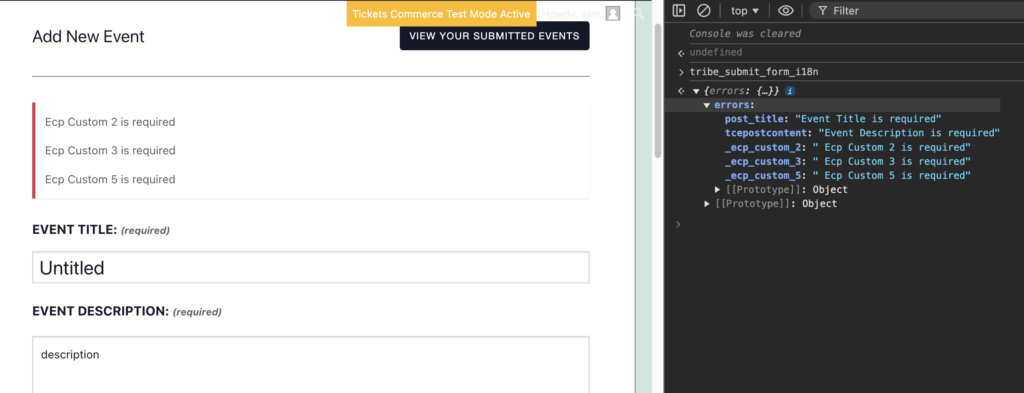
To enhance the clarity of your error messages by pinpointing the required fields, you can integrate the following code snippet into your site:
With the snippet added, the error message will change from “Ecp custom 2 is required” to “Additional Field is required,” as the snippet replaces the field key (_ecp_custom_2) with the field label.
Another approach is to customize the error message completely; however, this works only for fields that don’t require a page reload. This is the snippet that we can add to adjust those error messages:
add_action(
	'wp_enqueue_scripts',
	function ( ) {
		// Ensure the script is enqueued.
		wp_enqueue_script( 'tribe_events-community' );

		// Modify the localization data.
		wp_add_inline_script(
			'tribe_events-community',
			'if ( tribe_submit_form_i18n.errors[ "_ecp_custom_2" ] ) {
        tribe_submit_form_i18n.errors[ "_ecp_custom_2" ] = "This is a custom field... Do not skip it!";
        }
        if (tribe_submit_form_i18n.errors[ "_ecp_custom_3" ] ) {
        tribe_submit_form_i18n.errors[ "_ecp_custom_3" ] = "Seriously?! You\'re skipping this one too?";
        }
        if (tribe_submit_form_i18n.errors[ "_ecp_custom_5" ] ) {
        tribe_submit_form_i18n.errors[ "_ecp_custom_5" ] = "I\'m calling your manager.";
        }',
			'before'
		);
	}
);
And here is how that snippet will change those error messages:
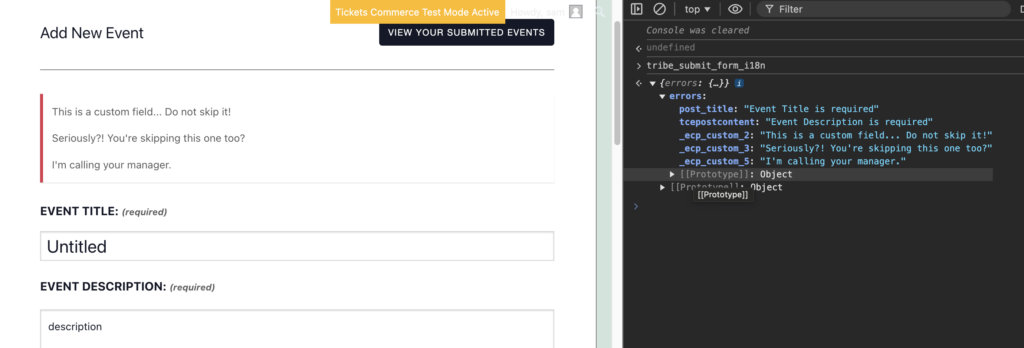
You should tweak that snippet to match the additional field you want to change and adjust the error message(s) to be how you want them to show on your site.
Wrapping Up
If you run into any issues, feel free to open a ticket with our support team. We’re always here to help with the basics, but please keep in mind that our ability to assist with customizations might be a bit limited. Happy coding!