
BuddyBoss is a powerful WordPress platform designed to help you build and manage online communities, social networks, and membership sites with ease. It offers a wide range of features, including customizable member profiles, activity feeds, group forums, and private messaging, all designed to foster engagement and collaboration.
By integrating BuddyBoss with The Events Calendar, you can seamlessly combine the robust community-building tools of BuddyBoss with the comprehensive event management capabilities of The Events Calendar, creating an all-in-one solution for organizing and promoting events within your community.
We’ve developed a detailed guide on integrating The Events Calendar with BuddyBoss, walking you through the step-by-step process of configuring the plugin for optimal compatibility with our products.
However, there is a specific setting in BuddyBoss that you should be aware of, as it can potentially cause issues with the functionality of our plugins, such as problems with calendar navigation, date selection, and other related features.
REST API Setting
Under BuddyBoss → Settings → Privacy, you’ll need to uncheck Restrict REST API access to only logged-in members option and hit Save Settings.
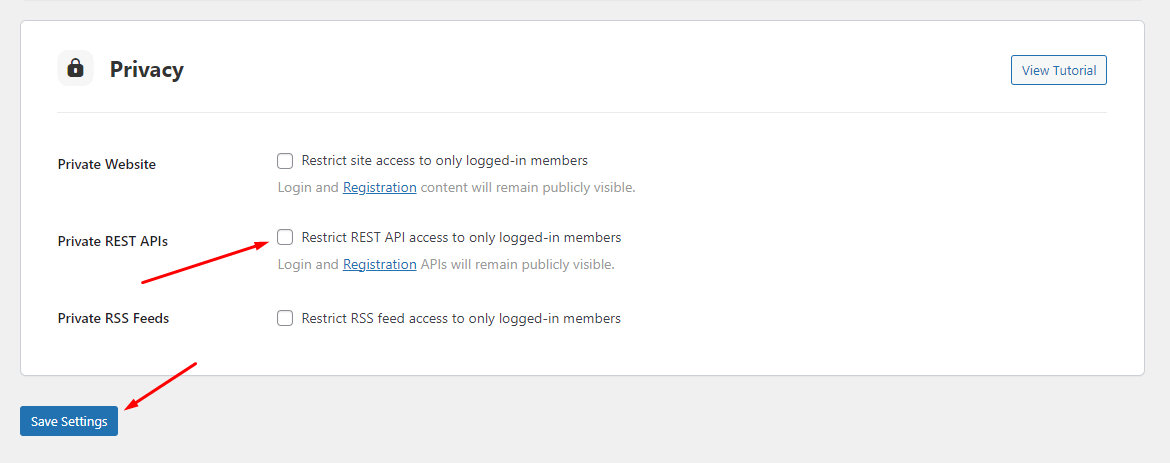
This is because our plugins depend on the REST API for proper functionality, so it’s essential to disable this option.
This guide gives you all the information that you need to address conflicts when integrating BuddyBoss with The Events Calendar! Don’t hesitate to pay us a visit over at our help desk if you should have any lingering questions–we’re more than happy to assist!