
Using Event Tickets Wallet Plus, customizing event ticket PDFs to provide additional information often involves modifying files located in the event-tickets-plus\src\views\tickets-wallet-plus\pdf\ directory. One common customization is adding a custom note below the event details. For example, if one needs to include special instructions, messages, or personalized greetings on the ticket, they would typically modify the body.php file.
Note: This is only available with Event Tickets Wallet Plus.
To start with, let’s see what files are being loaded when the PDF file is generated. There are four files needed to generate the PDF file, as seen in the template file included in pass.php located at event-tickets-plus\src\views\tickets-wallet-plus\pdf\pass.php.
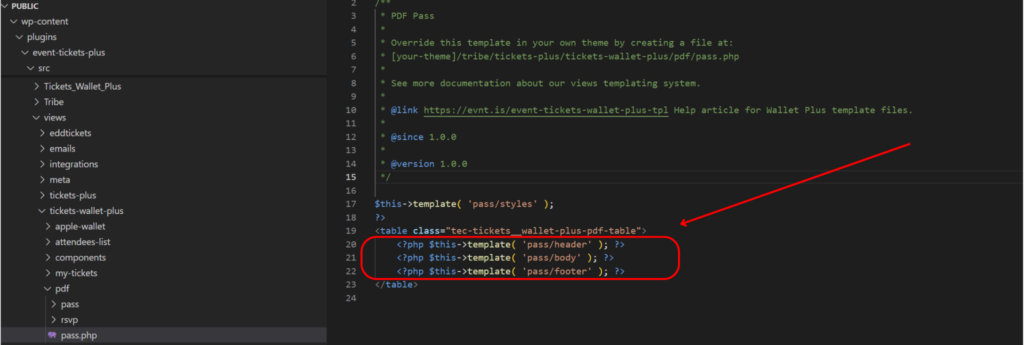
styles.php → This loads the PDF's style.header.phpbody.phpfooter.php
See the image below for how it is structured.

Depending on your layout and customization, you should modify one (or more) file. All the files are located at event-tickets-plus\src\views\tickets-wallet-plus\pdf
As an example, let’s say that you need to add a note below the event detail, in this case, you should modify body.php file. To accomplish this, make a copy of body.php and upload it at [your-theme]/tribe/tickets-wallet-plus/pdf/pass.php
Open the file in a text editor and add your own custom note, similar to the example below:
<?php
/**
 * PDF Pass: Body
 *
 * Override this template in your own theme by creating a file at:
 * [your-theme]/tribe/tickets-wallet-plus/pdf/pass/body.php
 *
 * See more documentation about our views templating system.
 *
 * @link https://evnt.is/event-tickets-wallet-plus-tpl Help article for Wallet Plus template files.
 *
 * @since 1.0.0
 *
 * @version 1.0.0
 */

?>
<tr>
	<td height="670">
		<table class="tec-tickets__wallet-plus-pdf-body-table">
			<tr>
				<td>
					<?php $this->template( 'pass/body/post-title' ); ?>
				</td>
			</tr>
			<tr>
				<td width="320">
					<table class="tec-tickets__wallet-plus-pdf-ticket-info-table">
						<tr>
							<td width="300">
								<?php $this->template( 'pass/body/ticket-info' ); ?>
								<p>This is my custom note</p>
							</td>
						</tr>
					</table>
				</td>
				<td>
					<?php $this->template( 'pass/body/sidebar' ); ?>
				</td>
			</tr>
		</table>
	</td>
</tr>
Following these steps enables users to quickly include personalized touches into their event ticketing PDF styling, providing attendees with a more informative and engaging experience. This customization enhances the practical information provided and aligns the ticketing process with the unique branding and communication needs of their event.